Tuesday, September 2, 2014

Oracle SOA Transform multiple sources to the target using XSD Transformer

Oracle SOA Transform multiple sources to the target using XSD Transformer


Middleware is mainly used to call multiple webservices and transform the result from the multiple services and return back the result to the client. This is easily achived using Oracle Bpel XSD transformation
First we need to call different targetted services and assign the return values to variable. These variable can be selected as sources.

Example: 
Billing Service Output is stored in "Receive_Billing_Variable"
Credit Check output is stored in "REceive_Credit_Check_Variable"

These two variable can be selected as source in "Edit Transformer" by selecting the "+" symbol of source

Oracle SOA BPEL Transaction Quick Chat

Oracle BPEL we can set the transaction explicitly. If transaction is defined then that set of events will be working as unit. If there is failure in any event then that unit will be rolled back.

If we didn’t define the transaction explicitly then all the event will be working as single unit.


The table below summarises the transaction status when performing different activities.

Activity

Transaction Status in BPEL Process

Transaction Status in Target Process or Adapter

ReceiveNew TransactionN/A
Receive with Property “transaction=participate”Use Existing Transaction from CallerN/A
Invoke Synchronous ProcessUse Existing TransactionNew Transaction
Invoke Synchronous Process with Partner Link Property “transaction=participate”Use Existing TransactionUse Existing BPEL Transaction
Invoke Synchronous Process with Partner Link Property “idempotent=false”New TransactionNew Transaction
Invoke Synchronous Process with Partner Link Property “nonBlockingInvoke=true”New TransactionNew Transaction
Invoke Asynchronous ProcessUse Existing TransactionNew Transaction
Invoke Asynchronous Process with Partner Link Property “transaction=participate”Use Existing TransactionNew Transaction
Invoke Synchronous Process with Partner Link Property “idempotent=false”New TransactionNew Transaction
Wait < a couple of secondsUse Existing TransactionN/A
Wait > a couple of secondsNew TransactionN/A
FlowUse Existing Transaction 


Monday, August 25, 2014

Oracle SOA Port number

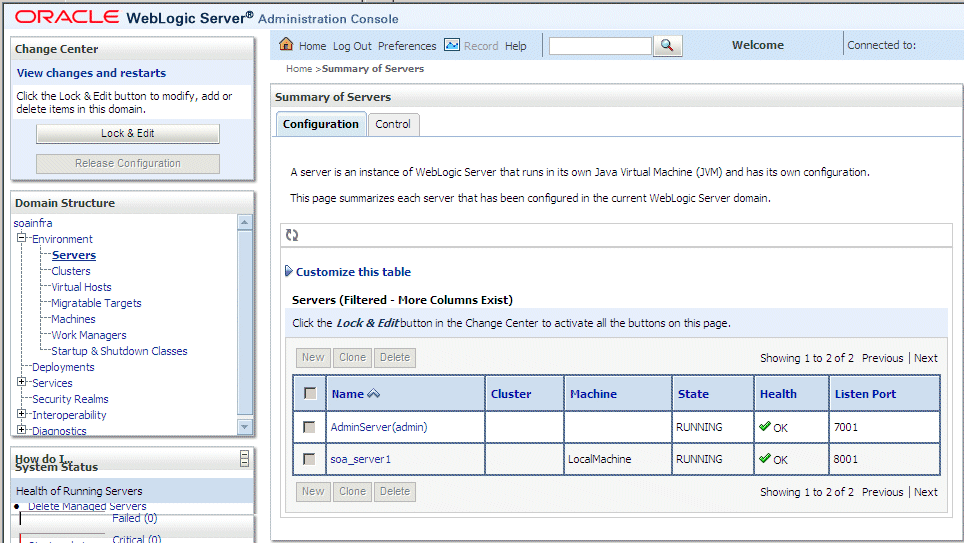
To find the listening port for logging into the Oracle admin console, b2b console or anything we can get the port infrom config.xml under domain

MW_HOME/user_projects/domains/your_domain_name/config/config.xml
<server>
    <name>soa_server1</name>
    <ssl>
      <name>soa_server1</name>
      <listen-port>7001</listen-port>
    </ssl>
    <machine>LocalMachine</machine>
    <listen-port>7001</listen-port>
    <listen-address/>
  </server>

We can also get the port number from admin colse for other services, please check the screenshot below


Tuesday, August 19, 2014

How to resolve Oracle BPEL The role named on this partnerLinkType uses portType which is not defined anywhere.


When we are deleting an activity in Oracle BPEL process in design view that activity may not be removed from WSDL file by JDeveloper. This is a bug in JDeveloper. So we need to search for the id in WSDL and remove them manually.


Issue: Error(30): The role named "BPELProcess1Requester" on this partnerLinkType uses portType "client:BPELProcess1Callback" which is not defined anywhere.

Rootcause: BPEL JDeveloper BPEL Design Not updating WSD

Solution:
Search the id (In my case client:BPELProcess1Callback) in wsdl and remove it.

Ie., Remove below entry from wsdl
<plnk:role name="BPELProcess1Requester">
<plnk:portType name="client:BPELProcess1Callback"/>
</plnk:role>

Thursday, August 14, 2014

Oracle SOA BPEL solution for no start activity


While I process the request from Restfullservice in BPEL process I was getting "There is no start activity in process" error. Root cause of this issue is BPel process is not able to create instance. To fix it we need to enable the create instance of receive activity of BPEL process. Good Luck. Provided screenshot below.


Issue: Error(30): There is no start activity in process "BPELProcess"

Solution: 
1. Double-click on the Receive activity.

2. Check the "Create Instance" checkbox and click on "OK".


Tuesday, January 28, 2014

OSB Service Pooling for high availability


High Availability is major usability for OSB. Consider we need to consume an 3rd party Billing service, consider billing service exposes three different endpoint URI for achieving hight availability. To make use of high avaiabily in the transport layer of OSB we can provide all three endpoint URI of 3rd party services.

Download Busines Service Source: https://drive.google.com/file/d/0B1o4dd3z33rESzJ2SC1SbkdhV28/edit?usp=sharing


Steps:
1. In the General tab point the 3rd party business service wsdl file

2. In the transport tab in default we will be seeing an end point uri once step 1 is completed. Since 3rd part has exposed three service we need to add additional two services endpoint uri.


3. Now need change the retry count. This is very important. Default value of this is zero. if its zero then it will just try to hit the first endpoint url and OSB wont try with other two endpoint uri! Hence we need to set this value to the required amount. Below example I have set to "1", it means if the first url fails then second url will be fired.


From Reference Docs:
You can define the retry option for business services. The retry option specifies the maximum number of times a business service can attempt to access endpoint URIs after an initial failure. For example, consider the behavior of a business service B with endpoint URIs eu1, eu2, and eu3, when the retry count is set to 1, 2, and 4.
When Retry Count = 1 – If business service B fails to process a request or is unable to access the endpoint URI eu1, it tries to process the request with eu2 (retry 1). If the retry fails then the business service returns failure. The business service does not retry the third endpoint URI eu3.
When Retry Count = 2 – If business service B fails to process a request or is unable to access the endpoint URI eu1, it tries to process the request with eu2 (retry 1). If the retry fails then the business service tries to process the request with eu3 (retry 2). If the retry fails then the business service returns failure.
When Retry Count = 4 – If business service B fails to process a request or is unable to access the endpoint URI eu1, it tries to process the request with eu2 (retry 1). If the retry fails then the business service tries to process the request with eu3 (retry 2). Then the business service waits for a interval you have configured for retry iteration interval (in seconds) before trying eu1 (retry 3). If this fails the business service retries eu2 (retry 4). If the retry fails then the business service returns failure.
If the retry count is set to 0, then the business service does not retry after the failure.
http://docs.oracle.com/cd/E23943_01/admin.1111/e15867/endpointurimgmt.htm